Letter-writing season is around the corner. I recently adapted this pandoc workflow for generating PDF letters by only editing a markdown file. I only made the following minor changes to the original:
-
Included the
fontawesome5package so I could add icons alongside the phone number, email, and website in the letterhead. -
Changed
ThisULCornerWallPapertoCenterWallPaperand addedwpYoffsetandwpXoffsetso I could get a left margin on the logo (I suppose this could also be done by offsetting the logo in theletterhead.pdffile).
Here’s what the output looks like with some random sample content:
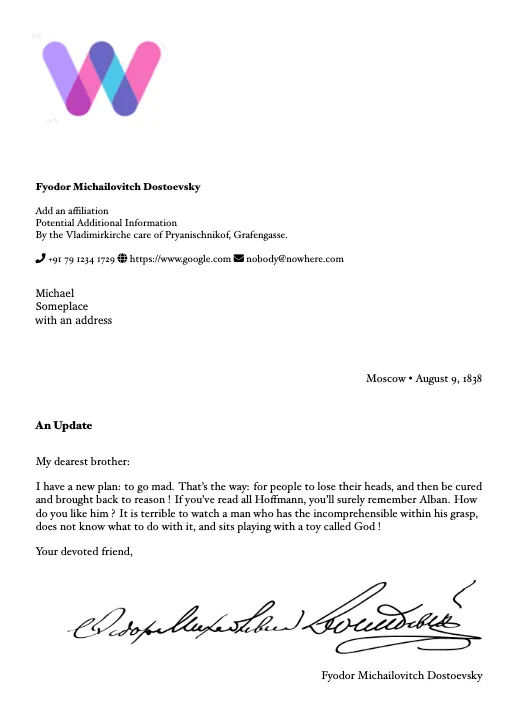
The markdown is very simple to edit — most of the information is up in the YAML header, and it looks like this:
author: Fyodor Michailovitch Dostoevsky
city: Moscow
from:
- By the Vladimirkirche
- care of Pryanischnikof, Grafengasse.
affiliation1: Add an affiliation
affiliation2: Potential Additional Information
contact:
- \faPhone \ +91 79 1234 1729
- \faGlobe \ https://www.google.com
- \faEnvelope \ nobody@nowhere.com
to:
- Michael
- Someplace
- with an address
subject: An Update
salutation: My dearest
toname: brother
customdate: 1838-8-9
Write the body of the letter in markdown as usual, and generate the PDF by running:
pandoc letter.md -o output.pdf --template=template.tex --pdf-engine=xelatexor have a makefile that looks like this:
TEX = pandoc
FLAGS = --pdf-engine=xelatex

src1 = template.tex letter.txt
op1 = output

all : $(op1).pdf

$(op1).pdf : $(src1)
	$(TEX) $(filter-out $<,$^ ) -o $@ --template=$< $(FLAGS)
For your first use, you would want to update the images for the letterhead and the signature, and optionally customize the fonts to your liking. Fork this repo to make your own!